OneTrackMind Test version
Recce. Ride. Report.
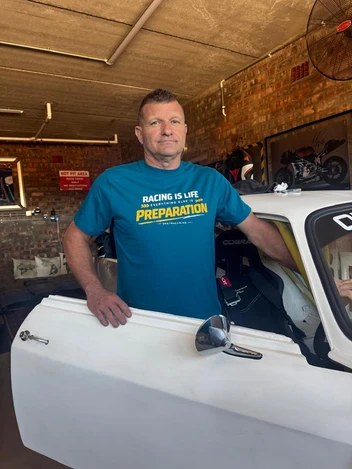 Built by Ashley. 25 years at Ducati and KTM, now Alfas on a farm. Add your favourite routes, mark the places worth stopping.
 AlterEgo Build Race Repeat hoodie, from $65 › Ad
Plan it. Book it. Ride it.
Forget BaseCamp and five different apps. Route a multi-day trip in minutes, sort your beds, then send it straight to your GPS, your bike's app or your phone and navigate from there.
- Route it in minutesReal roads, graded for your bike, 4x4 or car. Fuel gaps, sunset and weather checked for every day.
- Book your bedsPlaces to stay at every night stop. Pick one, book it, tick it off.
- Load your GPSOne tap: the right GPX for Garmin, BMW, KTM, Ducati or Harley.
- Or just ride with your phoneEach day opens in Google Maps or Waze. No GPS? No problem.
Opens a finished trip. Change anything, or tap New to plan your own.
How it works
1. Start
- New starts a fresh trip (with Undo). Open loads a pick, a rider's route or one you saved. GPX plans from a file. 🧭 Near me shows what's around you.
- You start from your location (tap it to change). Type Where to?, then + Add a stop for anything on the way. Tick Round trip to finish where you start. Each day gets a tab.
- The days follow the trip. A long trip is split into days by your longest day setting, each night in a town with beds. Tap 🛏 on a stop to sleep there (one day more), ✕ on a night to ride through (one day less), or use Days − +. Add a place to stay as a stop and it becomes a night. Set only when you Leave.
- ✏ Draw lets you tap the map point to point, following roads or in a straight line for tracks the map doesn't show.
2. Stops
- Your stops have a green bar. SUGGESTED stops are fuel the app adds; ✕ removes one for good.
- 🛏 Night stops are boxed. "town" means you haven't picked a place to sleep yet.
- Tap a stop to see it on the map and what's there. Every stop shows the icons you've switched on under On the map (fuel, places to stay, food, sights) on its main line: tap one to zoom to the stop and see just those (faded means none). ⋯ renames, moves or removes it.
- Press and hold the map (click on a computer) to add a stop, swap one, or sleep there.
3. Roads
- Each stretch shows how you get there: brown is your road choice from Settings, blue (the freeway) is the quickest way by the main roads, the same as normal sat-nav. Tap it to switch. On Tar every stretch is the freeway.
- Tar (in Settings) routes like normal sat-nav: main roads, no gravel. Road less travelled finds gravel, not passes: tap Ride it under Passes nearby.
- Grades, easy to hard: Race · Pre-jeep · Jeep · Pre-single · Single. Read for what you ride: Jeep is fun on a bike, slow in a car.
4. Fuel
- Set how far you go between fills, with a safe margin (Stop at least every in Settings). It starts at 200 km for a bike and 450 km for a car or 4x4. A fuel town is suggested only when the next stretch is longer than that, and you're assumed to start each day with a full tank.
- Check fuel means a stretch longer than that with no fuel on our map. Tap it to see where. Tank goes further? Change the setting.
5. Where you sleep
- Each night lists places to stay, filtered by what you chose (camping, guesthouse…). Tap Info for details, Stay here to choose.
- Mark booked when it's done. The Overview lists every night with contacts and how many are booked.
6. Near me
- Tap 🧭 to see routes, passes, fuel, food and stays around you. What shows follows the On the map buttons; zoom in for more.
- Tap anything: Go here, Add as a stop or There and back. Tap 🧭 again to go back to your trip.
7. Before and on the road
- Each day shows km, riding time, sunset, weather and climb. Orange means look again.
- Good to know lists what to sort first: borders, holidays, long gaps without fuel or a hospital.
- Set My bike or GPS in Settings and the GPX file is made for it (each day, or the whole trip). No GPS? Google Maps / Waze opens each day on your phone, and Send these links sends them to you or the group. Share this trip (or WhatsApp this trip) makes one link anyone can open, no account needed: they get the whole plan, then Google Maps, Waze or GPX. Leading a group? Group ride pack zips every format, phone links included, with a read-me. Or Save as PDF. Sign in to save routes and open them on your phone.
8. Built by riders
- + Add yours shares a road or marks a place. 📍 on the map marks it in two taps on the road.
- Report the road, rate a route you rode. We check everything before other riders see it.
Worth knowing
- Map data can be wrong out in the sticks. Phone ahead on remote stretches, and tell us with Send feedback. Terms
✏ Drawing Tap the map to add the next point.
🧭 Near
How it started
My first trip into Namibia was in 2003 and I've been going back ever since. The trips got longer, the bikes got better and the breakdowns got more educational. A lap of the Nürburgring on a public Sunday, a desert rescue that turned into a lesson, Namibia again from the air conditioning of a car. OneTrackMind is where I put what I learnt, so you can plan the trip I wish I'd had. More about me ›
All of Ashley's stories ›